 Macro Manager
Game macros for any mouse and keyboard
Combos, rotations and key sequences that play while you hold a key – without G HUB, Synapse or any other vendor software. Free, for Windows.
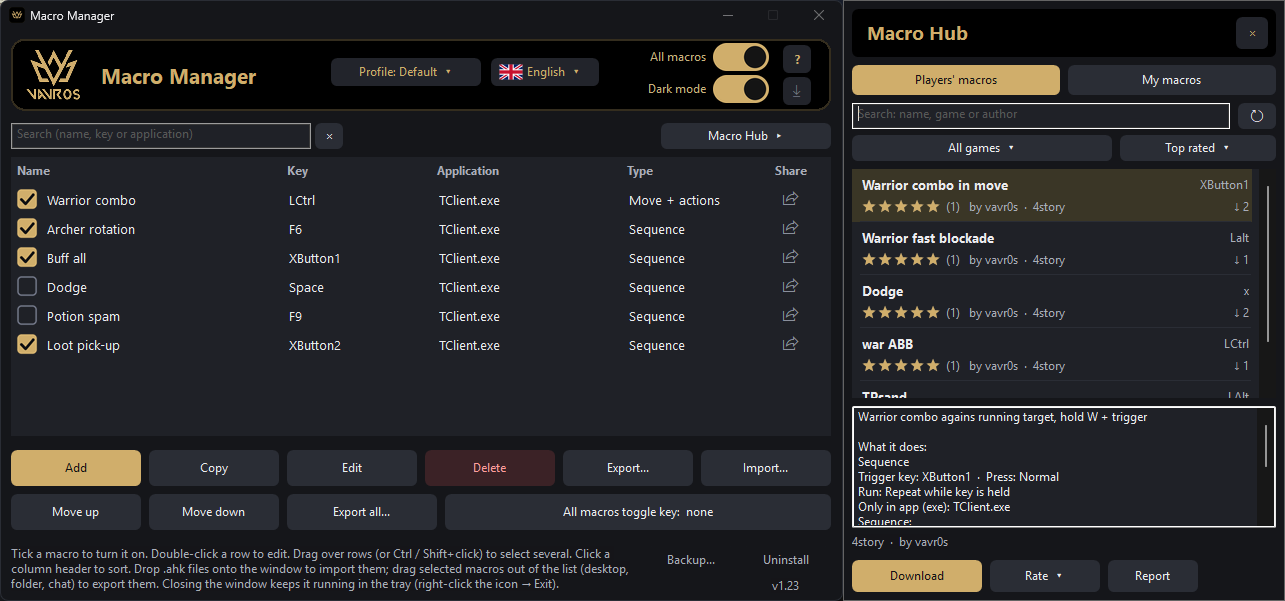
Everything a macro needs
Set it up once, tick it and play. Macros only run while you hold their key.
Any mouse, any keyboard
Start a macro with any key, the side or middle mouse button, the wheel, or a combination like Ctrl+XButton1.
Sequences with exact delays
Write steps like tap 1 600 or record them live. Delays are kept to about a millisecond.
Move + actions
Made for games where you keep moving and cast in between: movement and skills alternate in a cycle with the delays you set.
Tap, double tap, long press
Up to three macros on one key. Play once per press or repeat while the key is held – it stops the moment you let go.
Only in your game
A macro can work only while the chosen game is in front, so it never fires in chat, Discord or your browser.
Profiles and toggle keys
One set of macros per game or character. Toggle keys turn a single macro or all of them on and off without opening the window.
Scripts and export
Need more? Paste your own AutoHotkey v2 script. Any macro can be exported as an .ahk file – just drag it out of the list.
Updates and backup
New versions install with one click and keep your macros. Back up everything into one file and restore it on a new PC.
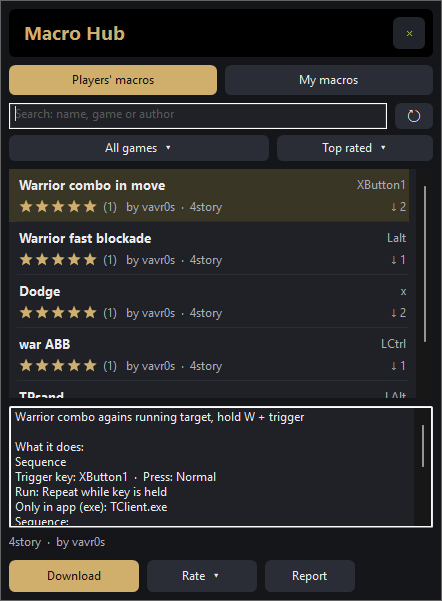
Macro Hub
Macros shared by players, right inside the app.
- Search by name, game or author, filter by game and sort by rating, newest or downloads.
- See exactly what a macro does – keys, delays, sequence – before you download it.
- Rate macros with stars. Macros checked by the moderator have a gold tick.
- Share your own macro with one click. When an author improves a macro you downloaded, the app tells you and shows what changed.
- Farm and AFK macros are not allowed – players can report them.
Install in a minute
Nothing else to install – everything the app needs is included.
Download
Get MacroManager-Setup.exe with the button below.
Run it
Windows may say “Windows protected your PC”, because the app isn't signed. Click More info → Run anyway.
Allow administrator
The app runs as administrator so macros also work in games that run as administrator. Pick a folder and shortcuts.
Play
Add a macro, tick it and hold its key in the game. The app updates itself from now on.
Questions
Is it really free?
Yes. No account, no ads, no paid features.
Do I need AutoHotkey or other software?
No. Everything is included in the installer. You also don't need the software of your mouse or keyboard.
Can I get banned for using macros?
Macro Manager presses keys just like you would. Whether macros are allowed depends on your game or server – check its rules. You use macros at your own risk.
My antivirus or Windows warns about the file.
The app isn't signed and is built with AutoHotkey, which some antivirus programs flag by mistake. The whole source code is public on GitHub.
Where are my macros stored?
On your PC, in the config folder next to the app. Macro Hub only gets the macros you decide to share.
My mouse has more side buttons. Can I use them?
Windows knows five mouse buttons. Set the extra ones in your mouse software to keys like F13–F24 and use those as triggers.
How do I uninstall it?
With the Uninstall button in the app or in Windows Settings → Apps. It offers to export your macros first.

Join the community
Help, bug reports, ideas and beta versions – on our Discord (in English).
 Join Discord